The Qiri console on a desktop display during a medication review: the patient on video, a live transcript, and his current medicines and allergies beside the call.
For consultant pharmacists

HMRs and RMMRs, from the home visit to the claim.

Qiri runs the paperwork for pharmacists who review medicines with no pharmacy behind them. Record the interview where it happens, follow up by video, and have every review ready to claim.

A Home Medicines Review starts in the patient's home.

Under the PPA program rules, the HMR interview is face to face, and most consult software only records a video call. Qiri records the interview where it happens, at home or at the facility for an RMMR, on the tablet or laptop you already carry.
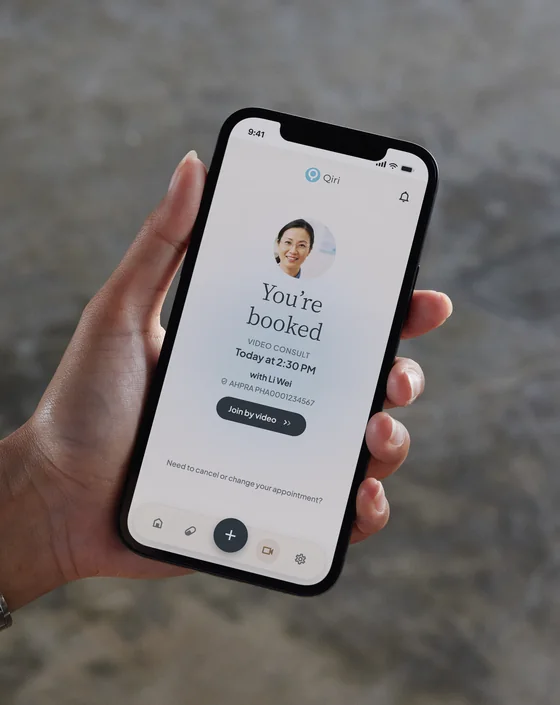
A hand holding a phone with the Qiri patient app on a booked video consult: the pharmacist's photo, the appointment time, her name and her AHPRA registration number.

Follow-ups by video, from 1 November 2026.

From 1 November 2026, HMR and RMMR follow-ups can be done by telehealth. In Qiri the follow-up is booked against the same patient, so the history of the review is already there when you open the call.

  • The patient taps a link. No account and nothing to install. They wait until you let them in.
  • They know who is calling. Your name and AHPRA registration are on their screen while they wait.
  • Phone works too. Book a follow-up as a phone consult when video is not right for the patient.

Bookings that run themselves.

Patients book into your real hours and pay when they book. Confirmations, reminders, changes and refunds happen without a phone call.

For the patient

  • Book a time that suits them. Open times follow your hours, from your booking link, your own website or the Qiri patient app.
  • Pay when they book. By card, straight into your account, for any service you put a price on.
  • A confirmation and a calendar invite. The email carries the link to join a video consult and an Add to calendar link.
  • Reminders. A day before and an hour before, in the Qiri patient app.
  • Change or cancel themselves. A new time keeps the payment. Cancelling more than 24 hours out refunds their card.

For you

  • Your hours, your services. Set when you consult, and close any single time you cannot take.
  • Your link, on your website. Each service has its own booking link and QR code, and a snippet to put booking on your own site.
  • Refunds handled. When you cancel, the patient is refunded in full before the time is freed, and they are emailed.
  • No-shows recorded. A booking nobody attended is marked Missed an hour after it was due, and is not refunded.
  • Paid out to you. Qiri's fee comes out before your payout. Patients never pay it.

Every review in one list, ready to claim.

Each HMR and RMMR appears under Programs when its consult ends, and stays there until it is lodged or you decide not to claim it.

  1. 1

    The record fills most of it

    The patient's name and Medicare number come from their record, and your MMR credential number from your account.

  2. 2

    You add the GP's details

    The GP's name and provider number, the referral date and the date the report went back. Qiri shows what is still missing.

  3. 3

    Copy it into PPA

    One press copies every field the claim needs. Lodge it in the PPA portal, then record the reference PPA gives you.

Qiri does not lodge claims with PPA for you yet. Check fees and deadlines in the PPA program rules.

You can take bookings the day you sign up.

On your own or as a company of pharmacists, the steps are the same.

  1. Sign up

    Your AHPRA registration number and ABN, and your first month is free. A company adds each consulting pharmacist as a seat. Admin staff are free.

  2. Your services are ready

    Video, phone, HMR and RMMR are set up for you. Change the times and prices, or add services of your own.

  3. Patients can find you

    Your practice is listed in the Qiri patient app, with a location you choose to name and never your registered address. Share your booking link with the GPs and facilities who refer to you.

  4. Take your first booking

    Qiri checks your registration and ABN in the background while you work. Only a check that does not pass closes bookings.

Also included

  • Ask Qiri during the review. Ask a clinical question during the interview or while you write the report. The answer cites its sources, including your own templates, protocols and facility procedures from your Library.
  • In the patient's language. Live captions during the consult, and your counselling translated into the language the patient speaks.
  • Your records stay yours. The transcript and your notes stay in the patient's record, with no timer deleting them. Export everything your practice holds at any time, including after you stop paying.

Questions consultant pharmacists ask

Can I do the HMR interview by video?

No. Under the PPA program rules the HMR interview is face to face. From 1 November 2026 the follow-ups can be done by telehealth. Qiri records the interview in person and runs the follow-ups by video or phone.

Does Qiri lodge my claims with PPA?

Not yet. Qiri keeps each review ready to claim, with every field in one place and one press to copy them. You lodge it in the PPA portal and record the reference, and the review is marked as lodged.

Do I need a pharmacy or a PBS approval number?

No. Each review is claimed under the pharmacist's MMR credential number, so a practice needs no premises. MedsCheck stays with pharmacies, because it is delivered in a pharmacy and claimed under its PBS approval number.

Where is the interview transcribed?

In Sydney. The audio is transcribed in Australia, and the recording is deleted after 120 days. The transcript and your notes stay in the patient's record.

Can I use Qiri in New Zealand?

Yes. The Consult plan is on sale in New Zealand too, built around MUR and MTA. See qiri.ai/nz/consults.

Qiri

Run your next review in Qiri.

Your first month is free. Set up your services and take your first booking today.